
Any
resemblance to any other tutorial or signature is merely coincidental
and is not intended.
I
am using the artwork of Very
Many
–. You can purchase this artwork and a license to use them HERE
you MUST have a license to use this work (Seashell)
I
am using the font:
Qaskin
Black
I
am using the Plugins:
Alien Eye Candy 5, MaRu
Miester Copies
I
am using kit:
"Blushing
Beach"
From Pink Paradox Productions, you can find it here
I
am using mask of your choice
I
am using Drop Shadow -3 Vert, 3 Hori, Opacity 74, Blur 5.8 Color
#202020
Pieces
of the kit used in this tutorial are:
-
Paper 32
-
Paper 38
-
Frame 6
-
Element 109
-
Element 99
-
Element 89
-
Element 51
-
Element 160
-
Element 155
-
Element 147
-
Element 61
-
Element 60
-
Element 30
-
Element 53
-
Element 35
-
Element 28
-
Element 101
-
Element 20
-
Element 71
-
Element 72
-
Element 5
-
Element 163
-
Element 169
You
must have working knowledge of PSP to complete this tutorial. This
tutorial was written using PSPX8
Open
new Canvas 800*800
New
Layer, flood fill with Paper 38,
Apply mask and resize to your liking, Merge Group
C/P
Frame
6,
resize to your liking, Use Magic wand, select inside of the frame,
Selections - expand, 5 pixels, New Layer, Flood fill with Paper 32
Paste
Full tube, resize and place to your liking, drop shadow
-
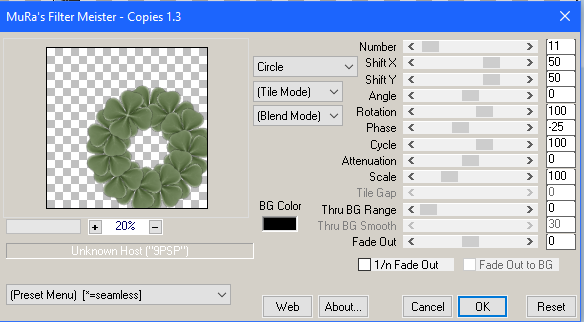
Element 109, apply Copies Plug in, resize and Place to your liking, drop shadow
-
Element 99, resize and Place to your liking, drop shadow
-
Element 89, resize and Place to your liking, drop shadow
-
Element 51, resize and Place to your liking, drop shadow
-
Element 160, resize and Place to your liking, drop shadow
-
Element 155, resize and Place to your liking, drop shadow
-
Element 147, resize and Place to your liking, drop shadow
-
Element 61, resize and Place to your liking, drop shadow
-
Element 60, resize and Place to your liking, drop shadow
-
Element 30, resize and Place to your liking, drop shadow
-
Element 53, resize and Place to your liking, drop shadow
-
Element 35, resize and Place to your liking, drop shadow
-
Element 28, resize and Place to your liking, drop shadow
-
Element 101, resize and Place to your liking, drop shadow
-
Element 20, resize and Place to your liking, drop shadow
-
Element 71, resize and Place to your liking, drop shadow
-
Element 72, resize and Place to your liking, drop shadow
-
Element 5, resize and Place to your liking, drop shadow
-
Element 163, Apply Eye Candy, resize and Place to your liking, drop shadow
-
Element 169, resize and Place to your liking,
Resize
the signature if needed
The
name:
I am using the font: Qaskin
Black,
size 20, #11335f,
Apply Eye Candy #c2d9bc,
Drop Shadow

Add
your copyright information and license number before save

No comments:
Post a Comment