Showing posts with label Sheena Pike. Show all posts
Showing posts with label Sheena Pike. Show all posts
Wednesday, November 25, 2020
Force of Nature CT Tag and Wallpaper


Sunday, August 25, 2019
Magick CT Tag, Snags and a Wallpaper

Made using "IB-Sheena Pike October 17" By Creative Scraps by Crys and 36-2 from Sheena Pike
Right Click to save your Snags in full size
Find the wallpaper full size here



Saturday, April 14, 2018
Timeless PTU Tut

Any
resemblance to any other tutorial or signature is merely coincidental
and is not intended.
I
am using the artwork of Sheena
Pike
–. You can purchase this artwork and a license to use them HERE
you MUST have a license to use this work (4-1)
I
am using the font:
Soulmaker
in the Mountains
I
am using the Plugins:
Alien Eye Candy 5,
I
am using mask of your choice
I
am using Drop Shadow -3 Vert, 3 Hori, Opacity 74, Blur 5.8 Color
#202020
Pieces
of the kit used in this tutorial are:
-
Paper 1
-
Paper 2
-
Frame 1
-
Element 20
-
Element 14
-
Element 16
-
Element 05
-
Element 12
-
Element 3
-
Element 11
-
Element 18
-
Element 01
-
Element 22
-
Element 19
-
Element 15
-
Word Art, apply Gradient Glow, drop shadow
You
must have working knowledge of PSP to complete this tutorial. This
tutorial was written using PSPX8
Open
new Canvas 800*800
New
Layer, flood fill with Paper 1,
Apply mask and resize to your liking, Merge Group
C/P
Frame
1,
resize to your liking, Use Magic wand, select inside of the frame,
Selections - expand, 5 pixels, New Layer, Flood fill with Paper 2
Paste
Full tube, resize and place to your liking, drop shadow
Element 20, resize and Place to your liking, drop shadow
Element 14, resize and Place to your liking, duplicate, mirror, drop shadow both
Element 16, resize and Place to your liking, drop shadow
Element 05, resize and Place to your liking, drop shadow
Element 12, resize and Place to your liking, drop shadow
Element 3, resize and Place to your liking, drop shadow
Element 11, resize and Place to your liking, drop shadow
Element 18, resize and Place to your liking, drop shadow
Element 01, resize and Place to your liking, drop shadow
Element 22, resize and Place to your liking, drop shadow
Element 19, resize and Place to your liking, drop shadow
Element 15, resize and Place to your liking, drop shadow
Word Art, apply Gradient Glow, drop shadow
Element 20, resize and Place to your liking, drop shadow
Element 14, resize and Place to your liking, duplicate, mirror, drop shadow both
Element 16, resize and Place to your liking, drop shadow
Element 05, resize and Place to your liking, drop shadow
Element 12, resize and Place to your liking, drop shadow
Element 3, resize and Place to your liking, drop shadow
Element 11, resize and Place to your liking, drop shadow
Element 18, resize and Place to your liking, drop shadow
Element 01, resize and Place to your liking, drop shadow
Element 22, resize and Place to your liking, drop shadow
Element 19, resize and Place to your liking, drop shadow
Element 15, resize and Place to your liking, drop shadow
Word Art, apply Gradient Glow, drop shadow
Resize
the signature if needed
The
name:
I am using the font: Soulmaker
in the Mountains,
size 20, #000000,
Apply Eye Candy #e7e7df,
Drop Shadow

Add
your copyright information and license number before save

Friday, March 2, 2018
Irish Skull PTU Tut

Any
resemblance to any other tutorial or signature is merely coincidental
and is not intended.
I
am using the artwork of Sheena
Pike
–. You can purchase this artwork and a license to use them HERE
you MUST have a license to use this work (22-3)
I
am using the font:
Celtic
Knots
I
am using the Plugins:
Alien Eye Candy 5, MuRa's
Miester Copies - Circle
I
am using mask of your choice
I
am using Drop Shadow -3 Vert, 3 Hori, Opacity 74, Blur 5.8 Color
#202020
Pieces
of the kit used in this tutorial are:
-
Paper 6
-
Paper 2
-
Frame 1
-
Splatter
-
Clover
-
Flower 4
-
Leaves
-
Flower
-
Shamrocks
-
Snail
-
Rainbow
-
Grass
-
Celtic Cross
-
Coins
-
Bird
-
Word Art
You
must have working knowledge of PSP to complete this tutorial. This
tutorial was written using PSPX8
Open
new Canvas 800*800
New
Layer, flood fill with Paper 6,
Apply mask and resize to your liking, Merge Group
C/P
Frame
1,
resize to your liking, Use Magic wand, select inside of the frame,
Selections - expand, 5 pixels, New Layer, Flood fill with Paper 2
Paste
Tube between Paper 2
and Frame
1.
Select paper layer, select all, float, invert, Select Tube Layer
Delete, Drop
Shadow
Clover
– Apply
MuRa's, Drop Shadow
Flower
4– Apply
MuRa's, Drop Shadow
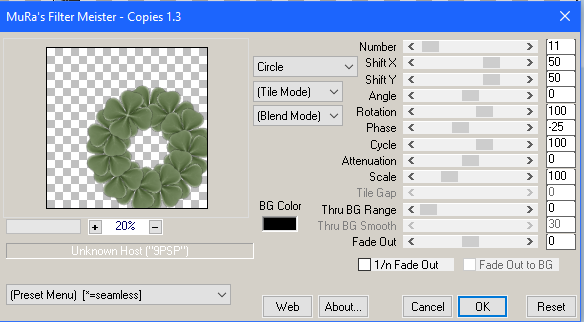
Leaves,
resize and Place to your liking, drop shadow
Flower,
resize and Place to your liking, drop shadow
Shamrocks,
resize and Place to your liking, drop shadow
Snail,
resize and Place to your liking
Rainbow,
resize and Place to your liking
Grass,
resize and Place to your liking
Celtic
Cross,
resize and Place to your liking, drop shadow
Coins,
resize and Place to your liking, drop shadow
Bird,
resize and Place to your liking, drop shadow
Word
Art,
resize and Place to your liking, drop shadow
Resize
the signature if needed
The
name:
I am using the font: Celtic
Knots,
size 20, #368a47,
Apply Eye Candy #eaeccf,
Drop Shadow
Add
your copyright information and license number before save
Subscribe to:
Posts
(Atom)
MY BLINKIE

Facebook Me

Stores I Sell In


Who I CT For

 "
"

CU Licenses


