Showing posts with label tutorials. Show all posts
Showing posts with label tutorials. Show all posts
Monday, June 4, 2018
Beauty PTU Tut


Any
resemblance to any other tutorial or signature is merely coincidental
and is not intended.
I
am using the artwork of Rebeca
Sinz
–. You can purchase this artwork and a license to use them HERE
you MUST have a license to use this work (Seelie)
I
am using the font:
A
Gentle Touch
I
am using the Plugins:
Alien Eye Candy 5, MaRu
Meisters
I
am using mask of your choice
I
am using Drop Shadow -3 Vert, 3 Hori, Opacity 74, Blur 5.8 Color
#202020
Pieces
of the kit used in this tutorial are:
-
Paper 2
-
Paper 1
-
Frame 1
-
Element 19
-
Element 8
-
Element 16
-
Element 11
-
Element 9
-
Element 14
-
Element 6
-
Element 19
-
Element 13
-
Element 17
-
Element 18
-
Element 12
-
Element 20
-
Word Art
-
Element 5
You
must have working knowledge of PSP to complete this tutorial. This
tutorial was written using PSPX8
Open
new Canvas 800*800
New
Layer, flood fill with Paper 2,
Apply mask and resize to your liking, Merge Group
C/P
Frame
1,
resize to your liking, Use Magic wand, select inside of the frame,
Selections - expand, 5 pixels, New Layer, Flood fill with Paper 1
Paste
Tube between Paper 1 and Frame
1.
Select paper layer, select all, float, invert, Select Tube Layer
Delete, Duplicate, Apply Guassian blur 3.0 to original, then set to
Soft Light
Element
19,
Apply Copies, Resize and drop shadow
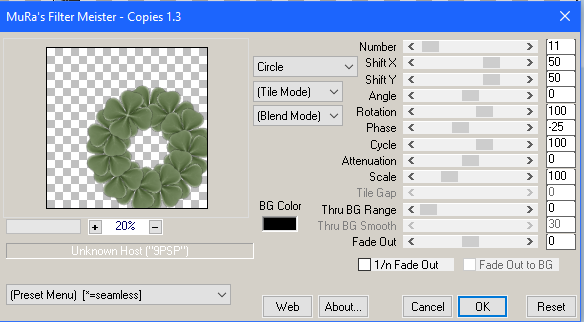
Element
8,
resize and Place to your liking, duplicate, mirror, drop shadow both
Element
16,
resize and Place to your liking, drop shadow
Element
11,
resize and Place to your liking, drop shadow
Element
9,
resize and Place to your liking, duplicate, mirror, drop shadow both
Element
14,
resize and Place to your liking, duplicate, mirror, drop shadow both
Element
6,
resize and Place to your liking, drop shadow
Element
19,
resize and Place to your liking, drop shadow
Element
13,
resize and Place to your liking, drop shadow
Element
17,
resize and Place to your liking, drop shadow
Element
18,
resize and Place to your liking, drop shadow
Element
12,
resize and Place to your liking, drop shadow
Element
20,
resize and Place to your liking, drop shadow
Word
Art, resize and Place to your liking, Apply Gradient Glow, drop
shadow
Element
5,
resize and Place to your liking, drop shadow
Resize
the signature if needed
The
name:
I am using the font: A
Gentle Touch,
size 20, #5277a5,
Apply Eye Candy #d2c2ac, Drop Shadow

Add
your copyright information and license number before save

Thursday, April 12, 2018
Emerald Beauty PTU Tut

Any
resemblance to any other tutorial or signature is merely coincidental
and is not intended.
I
am using the artwork of Misticheskaya
–. You can purchase this artwork and a license to use them HERE
you MUST have a license to use this work (Maureen)
I
am using the font:
Beau
Rivage Two
I
am using the Plugins:
Alien Eye Candy 5,
I
am using mask of your choice
I
am using Drop Shadow -3 Vert, 3 Hori, Opacity 74, Blur 5.8 Color
#202020
Pieces
of the kit used in this tutorial are:
-
Paper 6
-
Scene 7
-
Frame 5
-
Lamp 2
-
Flower 1
-
Flower 11
-
Stand 1
-
Floor 2
-
Flower 7
-
Bucket
-
Jars 1
-
Cage
-
Clock 1
-
Glass
-
Books 1
-
Phone 1
You
must have working knowledge of PSP to complete this tutorial. This
tutorial was written using PSPX8
Open
new Canvas 800*800
New
Layer, flood fill with Paper 6,
Apply mask and resize to your liking, Merge Group
C/P
Frame
5,
resize to your liking, Use Magic wand, select inside of the frame,
Selections - expand, 5 pixels, New Layer, Flood fill with Scene
7
Paste
Full tube, resize and place to your liking, drop shadow
Lamp
2,
resize and Place to your liking, drop shadow
Flower
1,
resize and Place to your liking, duplicate, mirror, drop shadow both
Flower
11,
resize and Place to your liking, duplicate, mirror, drop shadow both
Stand
1,
resize and Place to your liking, drop shadow
Floor
2,
resize and Place to your liking, drop shadow
Flower
7,
resize and Place to your liking, drop shadow
Bucket,
resize and Place to your liking, drop shadow
Jars
1,
resize and Place to your liking, drop shadow
Cage,
resize and Place to your liking, drop shadow
Clock
1,
resize and Place to your liking, drop shadow
Glass,
resize and Place to your liking, drop shadow
Books
1,
resize and Place to your liking, drop shadow
Phone
1,
resize and Place to your liking, drop shadow
The
name:
I am using the font: Beau
Rivage Two,
size 20, #0d4525,
Apply Eye Candy #ffffff, Drop Shadow
Add
your copyright information and license number before save
Saturday, January 13, 2018
Hedgie Love

Any
resemblance to any other tutorial or signature is merely coincidental
and is not intended.
I
am using the artwork of Laguna
–. You can purchase this artwork and a license to use them HERE
you MUST have a license to use this work (Hedgehog
and Pancakes)
I
am using the font:
Lovely
Home
I
am using mask of your choice
I
am using Drop Shadow -3 Vert, 3 Hori, Opacity 74, Blur 5.8 Color
#202020
Pieces
of the kit used in this tutorial are:
-
Paper 2
-
Paper 1
-
Frame 2
-
Element 3
-
Element 15
-
Element 16
-
Element 19
-
Element 9
-
Element 8
-
Element 12
-
Word Art
You
must have working knowledge of PSP to complete this tutorial. This
tutorial was written using PSPX8
Open
new Canvas 800*800
New
Layer, flood fill with Paper 2,
Apply mask and resize to your liking, Merge Group
C/P
Frame
2,
resize to your liking, Use Magic wand, select inside of the frame,
Selections - expand, 5 pixels, New Layer, Flood fill with Paper 1
Paste
Full tube, resize and place to your liking, drop shadow
-
Element 3, resize and Place to your liking, drop shadow
-
Element 15, resize and Place to your liking, drop shadow
-
Element 16, resize and Place to your liking, drop shadow
-
Element 19, resize and Place to your liking, drop shadow
-
Element 9, resize and Place to your liking, duplicate, mirror, drop shadow both
-
Element 8, resize and Place to your liking, drop shadow
-
Element 12, resize and Place to your liking, drop shadow
-
Word Art, resize and Place to your liking, drop shadow
Resize
the signature if needed
The
name:
I am using the font: Lovely
Home,
size 20, #d1b4
Add
your copyright information and license number before save
Sunday, January 7, 2018
Snuggly PTU Tut

Any
resemblance to any other tutorial or signature is merely coincidental
and is not intended.
I
am using the artwork of Very
Many
–. You can purchase this artwork and a license to use them HERE
you MUST have a license to use this work (White
Teddy
I
am using the font:
Freebooster
Script
I
am using the Plugins:
Alien Eye Candy 5,
I
am using mask of your choice
I
am using Drop Shadow -3 Vert, 3 Hori, Opacity 74, Blur 5.8 Color
#202020
Pieces
of the kit used in this tutorial are:
-
Paper 13
-
Paper 23
-
Frame 5
-
Element 64
-
Element 42
-
Element 96
-
Element 35
-
Element 44
-
Element 95
-
Element 30
-
Element 26
-
Element 20
-
Element 121
You
must have working knowledge of PSP to complete this tutorial. This
tutorial was written using PSPX8
Open
new Canvas 800*800
New
Layer, flood fill with Paper 13,
Apply mask and resize to your liking, Merge Group
C/P
Frame
5,
resize to your liking, Use Magic wand, select inside of the frame,
Selections - expand, 5 pixels, New Layer, Flood fill with Paper 23
Paste
Full tube, resize and place to your liking, drop shadow
Element
64,
resize and Place to your liking, drop shadow
Element
42,
resize and Place to your liking, drop shadow
Element
96,
resize and Place to your liking, drop shadow
Element
35,
resize and Place to your liking, drop shadow
Element
44,
resize and Place to your liking, drop shadow
Element
95,
resize and Place to your liking, drop shadow
Element
30,
resize and Place to your liking, drop shadow
Element
26,
resize and Place to your liking, drop shadow
Element
20,
resize and Place to your liking, drop shadow
Element
121,
resize and Place to your liking, drop shadow
Resize
the signature if needed
The
name:
I am using the font: Freebooster
Script,
size 20, #d33939,
Apply Eye Candy #fef7ee,
Drop Shadow
Add
your copyright information and license number before save
Pearl Love PTU Tut


Any
resemblance to any other tutorial or signature is merely coincidental
and is not intended.
I
am using the artwork of Rebeca
Sinz
–. You can purchase this artwork and a license to use them HERE
you MUST have a license to use this work (Pearl
Perfection)
I
am using the font:
Clicker
Script
I
am using the Plugins:
Alien Eye Candy 5,
I
am using mask of your choice
I
am using Drop Shadow -3 Vert, 3 Hori, Opacity 74, Blur 5.8 Color
#202020
Pieces
of the kit used in this tutorial are:
-
Paper 17
-
Paper 8
-
Frame 2
-
Element 121
-
Element 128
-
Element 120
-
Element 93
-
Element 119
-
Element 64
-
Element 101
-
Element 34
-
Element 33
-
Element 40
-
Element 62
-
Element 136
-
Element 142
You
must have working knowledge of PSP to complete this tutorial. This
tutorial was written using PSPX8
Open
new Canvas 800*800
New
Layer, flood fill with Paper 17,
Apply mask and resize to your liking, Merge Group
C/P
Frame
2,
resize to your liking, Use Magic wand, select inside of the frame,
Selections - expand, 5 pixels, New Layer, Flood fill with Paper 8
Paste
Tube between Paper 8
and Element.
Select paper layer, select all, float, invert, Select Tube Layer
Delete.
Element
121,
resize and Place to your liking, duplicate, mirror, drop shadow both
Element
128,
resize and Place to your liking, duplicate, mirror, drop shadow both
Element
120,
resize and Place to your liking, duplicate, mirror, drop shadow both
Element
93,
resize and Place to your liking, drop shadow
Element
119,
resize and Place to your liking, duplicate, mirror, drop shadow both
Element
64,
resize and Place to your liking, duplicate, mirror, drop shadow both
Element
101,
resize and Place to your liking, duplicate, mirror, drop shadow both
Element
34,
resize and Place to your liking, drop shadow
Element
33,
resize and Place to your liking, drop shadow
Element
40,
resize and Place to your liking, drop shadow
Element
62,
resize and Place to your liking, drop shadow
Element
136,
resize and Place to your liking, drop shadow
Element
142,
resize and Place to your liking, drop shadow
Resize
the signature if needed
The
name:
I am using the font: AuldMagick, size 20, #272e1e, Apply Eye Candy
#d2c2ac, Drop Shadow
Add
your copyright information and license number before save
Subscribe to:
Posts
(Atom)
MY BLINKIE

Facebook Me

Stores I Sell In


Who I CT For

 "
"

CU Licenses


