Wednesday, March 14, 2012
New PTU Kit Garden Magick

Available in stores now: The Psp Project, Country Corner Creations, Pics for Design, and Scrappin Dollars
(Note, if you bought the original kit from AOG, please email your receipt, and I'll send you the new and improved kit for free)

Sunday, March 11, 2012
Jungle Safari Kit New PTU

Saturday, March 10, 2012
PTU Patty Cake
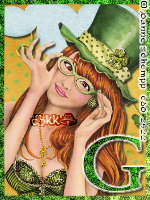
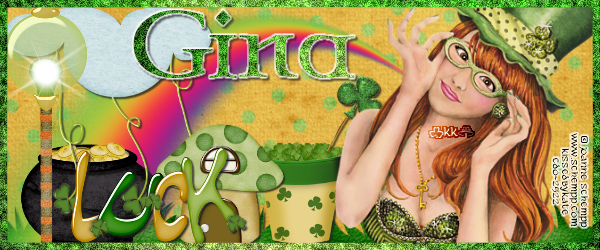
Any resemblance to any other tutorial or signature is merely coincidental and is not intended.
I am using the artwork of Joanne Schempp –. You can purchase her artwork and a license to use them HERE you MUST have a license to use her work
I am using the artwork of Joanne Schempp –. You can purchase her artwork and a license to use them HERE you MUST have a license to use her work
I am using the font : Celtic Garamond the second
I am using plugins: Eye Candy 3.1 HSB Noise, DBS Bright Noise,
Pieces of the kit used in this tutorial are
Paper 01
Paper 02
Grass
Rainbow
Cloud 1
Flower Pot
House 1
Lamp
WordArt01
You must have working knowledge of PSP to complete this tutorial. This tutorial was written using PSPXII
Open new Canvas 600*250
Open Paper 01, resize to 600*600, Paste, crop to fit
Selections, Select all
Selections, Modify, Selection Borders, Size 7, invert
New Layer, Flood Fill with Paper 2 (Open and select it as the pattern in your flood fill palette)
Eye Candy 3.1 HSB Noise
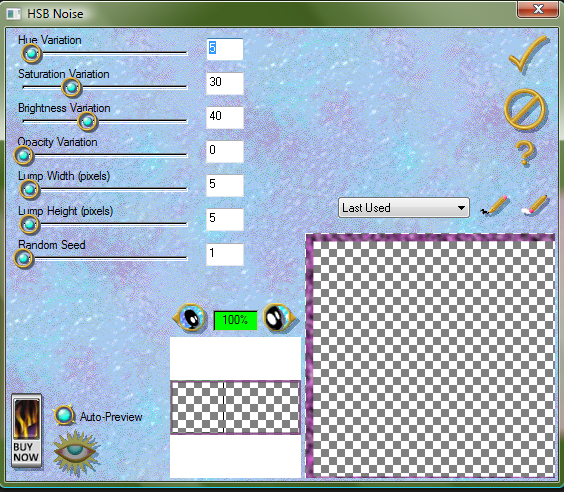
DBS Bright Noise, Intensity 45, Mixed
Paste your tube, move to Left hand side, resize and place to your liking, paste between BG and Border. crop off the extras, drop shadow
Grass, Paste behind tube resize
Rainbow, resize and place to your liking
Cloud 1 resize and Flip, place to your liking
Flower Pot, resize and place to your liking
House 1, resize and place to your liking
Lamp, resize and place to your liking
WordArt01, resize and place to your liking
Apply drop shadow to your taste. Mine are all 2*2’s
The name. Using the same fill as the border, Paper 02, size 20. Repeat the HSB Noise and the Bright Noise, Eye Candy 3.1 Glow 2 pixel, fat setting color #FFFFF
Drop Shadow to your liking
Add your copyright information and license number before save
Now for the Avatar
Open new Canvas 150*200
Resize Paper 8 to 200*200, Paste
Add Border with Previous settings, only with 4 instead of 7
Add your tube and delete excess
Add your elements
Add Copyright and liscense number
Add your initial, or text, effects like before
Tuesday, March 6, 2012
PTU Aren't I Lucky Tut

Any resemblance to any other tutorial or signature is merely coincidental and is not intended.
I am using the artwork of Graphix–. You can purchase his artwork and a license to use them HERE you MUST have a license to use his work
I am using the artwork of Graphix–. You can purchase his artwork and a license to use them HERE you MUST have a license to use his work
I am using the font: Irish Saddle
I am using plugins:,
I am using Mask #4 by Annaica in the St Patrick’s Day Collab find that here
Pieces of the kit used in this tutorial are
KKpaper12
KKpaper10
KK Frame
KK Scatter
KK Beer
KK Celtic Knot Bush
KK Frog
KK Word Art 1
KK Doodle
Sparkles
You must have working knowledge of PSP to complete this tutorial. This tutorial was written using PSPXII
Open new Canvas 600*600
Open KKPaper 3. Paste apply mask and resize to your liking, Merge Group,
Open KKframe , rotate to your liking c/p to canvas, resize to your liking.
Open KKpaper10,. Paste under your frame, using your Magic Wand, select the inside of your frame, go to Selections, Modify, Expand, 3 pixels. Select okay, invert selection and delete leaving the inside of the frame with your paper.
Take your tube resize and place to your liking after pasting it under the frame, using your Magic Wand, select the inside of your frame, go to Selections, Modify, Expand, 3 pixels. Select okay, invert selection and delete leaving the inside of the frame with your tube. Dupliate. Set Copy to Soft Light, Original, Guassian Blur 3.0, drop shadow to your liking
Paste your full tube layer on top, resize and place to your liking, Apply Lokas 3-D plug in
KK Scatter, Paste over the top of your Mask, place to your liking,
KK Beer, resize and place to your liking
KK Celtic Knot Bush, resize and place to your liking
KK Frog, Resize and place to your liking,
Word Art 1, resize and place to your liking
KK Doodle resize and place to your liking
Sparkles, resize, place to your liking
Apply drop shadow to your taste. Mine are all 2*2’s
Resize the signature if needed
The name. Using Irish Saddle, size 22 Colors ##d21e1e, #f8e121, #f69a41, #27941e, #42cbe9. Add Noise, Uniform, Monochrome, #74
Drop Shadow to your liking
Add your copyright information and license number before save
Monday, February 27, 2012
Ptu Til Death Tut

Any resemblance to any other tutorial or signature is merely coincidental and is not intended.
I am using the artwork of Susan Justice You can purchase his artwork and a license to use them HERE you MUST have a license to her her work
I am using the artwork of Susan Justice You can purchase his artwork and a license to use them HERE you MUST have a license to her her work
I am using the font: Wedding Bliss ES
I am using plugins: Eye Candy 3.1
Pieces of the kit used in this tutorial are
PP10
PP5
Bird Frame
Cake
Rings
Glass
Candle2
You must have working knowledge of PSP to complete this tutorial. This tutorial was written using PSPXII
Open new Canvas 600*600
Open new Canvas 600*600
Open PP10 and resize to 600*600. Paste apply mask and resize to your liking, Merge Group,
Open Bird Frame c/p to canvas, resize to your liking.
Open PP5, resize to 600*600. Paste under the frame, use your magic wand, click the inside of the heart, Selections, expand 3 pixels, invert, select paper, delete leaving paper in the frame
Paste your tube over the top of PP9. Place and resize so the faces are what you see. Use the wand to select the outside of PP9, Invert, Delete, Duplicate, Apply Soft light to Dupliate Layer, Guassian Blur 3.0 and drop shadow to the original. Take the full tube and paste it and move it to the right side of the siggy,
Cake, resize and place to your liking
Rings, resize and place to your liking
Glass resize and place to your liking
Candle2 resize and place to your liking
Apply drop shadow to your taste. Mine are all 2*2’s
Resize the signature if needed
The name. Wedding Bliss ES size 36 Color # #7c0407, apply Eye Candy 3.1 Glow color FFFFF, Fat, Pixels 2
Drop Shadow to your liking
Add your copyright information and license number before save, resize if needed
Saturday, February 25, 2012
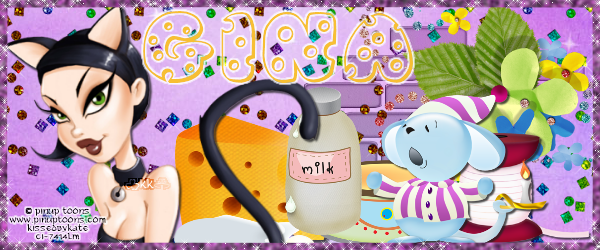
Ptu When the Cat's Away Tut
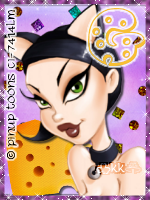
Any resemblance to any other tutorial or signature is merely coincidental and is not intended.
I am using the artwork of PinUp Toons –. You can purchase his artwork and a license to use them HERE you MUST have a license to use his work
I am using the artwork of PinUp Toons –. You can purchase his artwork and a license to use them HERE you MUST have a license to use his work
I am using the font JI Swiss Cheese
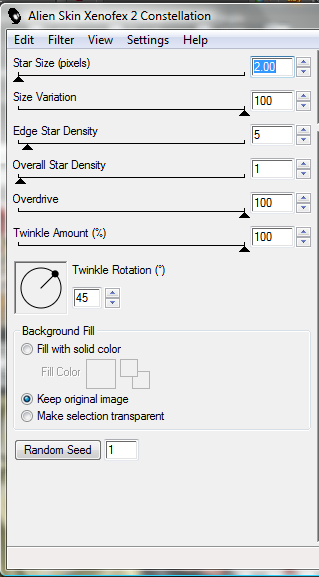
I am using plugins: Eye Candy 3.1 HSB Noise, Xenofex 2, Constellation
Pieces of the kit used in this tutorial are
Paper 08
Sparkle
Bricks
Flower Cluster
Spool
Dish
Mouse 04
Cheese
Milk
You must have working knowledge of PSP to complete this tutorial. This tutorial was written using PSPXII
Open new Canvas 600*250
Open Paper 08, resize to 600*600, Paste, crop to fit
Selections, Select all
Selections, Modify, Selection Borders, Size 7, invert
New Layer, Flood Fill #884c88
Eye Candy 3.1 HSB Noise
Xenofex 2, Constellation
Paste your tube, move to Left hand side, resize and place to your liking, paste between BG and Border. crop off the extras
Sparkle, Rotate to the left, paste, duplicate until you like your results
Bricks, resize and place to your liking, put under the sparkle layer, luminance legacy
Flower Cluster, resize and place to your liking
Spool, resize and place to your liking
Dish, resize and place to your liking
Mouse 04, resize and place to your liking
Cheese, resize and place to your liking
Milk, resize and place to your liking
Apply drop shadow to your taste. Mine are all 2*2’s
The name. Using the JI Swiss Cheese size 22 Colors #f7bf34,
Candy 3.1 Glow 2 pixel, fat setting color #FFFFF
Drop Shadow to your liking
Add your copyright information and license number before save
Now for the Avtar
Open new Canvas 150*200
Resize Paper 8 to 200*200, Paste
Add Border with Previous settings, only with 4 instead of 7
Add your tube and delete excess
Add your elements
Add Copyright and liscense number
Add your initial, or text, effects like before
PTU Sweet Party Girl Tut

Any resemblance to any other tutorial or signature is merely coincidental and is not intended.
I am using the artwork of Robert Alvarado, you can purchase his artwork at Psp Tube Emporium, you MUST have a license to use his work!
I am using the artwork of Robert Alvarado, you can purchase his artwork at Psp Tube Emporium, you MUST have a license to use his work!
I am using the font: Almond Script
Pieces of the kit used in this tutorial are
Paper 6
Paper 1
Frame 2
Element 17
Element 18
Element 41
Element 31
Element 50
Element 22
Element 38
Element 49
Element 15
Element 30
You must have working knowledge of PSP to complete this tutorial. This tutorial was written using PSPXII
Open new Canvas 600*600
You must have working knowledge of PSP to complete this tutorial. This tutorial was written using PSPXII
Open new Canvas 600*600
Open Paper 6 and resize to 600*600. Paste apply mask and resize to your liking, Merge Group,
Open Frame 2 c/p to canvas, resize to your liking.
Open paper 1, resize to 600*600. Paste under your frame, using your Magic Wand, select the inside of your frame, go to Selections, Modify, Expand, 3 pixels. Select okay, invert selection and delete leaving the inside of the frame with your paper.
Take your close up, paste under the frame, using your Magic Wand, select the inside of your frame, go to Selections, Modify, Expand, 3 pixels. Select okay, invert selection and delete . Apply full size Tube on the top of Frame, Mirror
Element 17, resize and place to your liking
Element 18, resize and place to your liking
Element 41 resize and place to your liking
Element 31, resize and place to your liking
Element 50, resize and place to your liking
Element 22, resize and place to your liking
Element 38, resize and place to your liking
Element 49, resize and place to your liking
Element 15, resize and place to your liking
Element 30, resize and place to your liking
Apply drop shadow to your taste. Mine are all 2*2’s
Resize the signature if needed
The name. Using Almond Script Size 24, color #8e6f5b. Selections, Select Vector Object. Selections, Modify, Expand, 3. New Layer, under the font Flood Fill with #f5a4a3
Drop Shadow to your liking
Add your copyright information and license number before save
Wednesday, February 22, 2012
New PTU Kit Rockin Irish

Available soon at Fabulous Art Beginnings, The Psp Project, Country Corner Creations, Pics for Design, and Scrappin Dollars
Sunday, February 19, 2012
New PTU Kit Emerald Isle

Available soon at Fabulous Art Beginnings, The Psp Project, Country Corner Creations, Pics for Design, and Scrappin Dollars
Wednesday, February 15, 2012
New PTU Kit Celtic Magick

Available soon at Fabulous Art Beginnings, The Psp Project, Country Corner Creations, and Pics for Design
Subscribe to:
Posts
(Atom)
MY BLINKIE

Facebook Me

Stores I Sell In


Who I CT For

 "
"

CU Licenses


