Friday, August 10, 2018
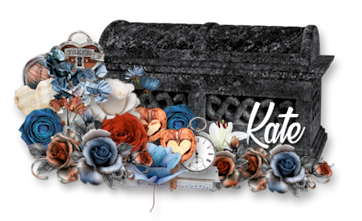
Keyed Maiden PTU Tut

Any
resemblance to any other tutorial or signature is merely coincidental
and is not intended.
I
am using the artwork of Enys
Guerrero
–. You can purchase this artwork and a license to use them HERE
you MUST have a license to use this work (34-1)
I
am using the font:
Hemera
Demo II
I
am using the Plugins:
Alien Eye Candy 5, MuRa's
Meister Copies
I
am using mask of your choice
I
am using Drop Shadow -3 Vert, 3 Hori, Opacity 74, Blur 5.8 Color
#202020
Pieces
of the kit used in this tutorial are:
-
Paper 8
-
Paper 1
-
Frame 1
-
Element 84
-
Element 61
-
Element 53
-
Element 76
-
Element 13
-
Element 77
-
Element 37
-
Element 39
-
Element 35
-
Element 65
-
Element 95
-
Element 17
-
Element 14
-
Element 23
-
Element 58
-
Element 92
-
Element 97
-
Element 5
You
must have working knowledge of PSP to complete this tutorial. This
tutorial was written using PSPX8
Open
new Canvas 800*800
New
Layer, flood fill with Paper 8,
Apply mask and resize to your liking, Merge Group
C/P
Frame
1,
resize to your liking, Use Magic wand, select inside of the frame,
Selections - expand, 5 pixels, New Layer, Flood fill with Paper 1
Paste
Close up Tube between Paper 1 and Frame
1.
Select paper layer, select all, float, invert, Select Tube Layer
Delete.
Paste
Full tube, resize and place to your liking, drop shadow
Element
84,
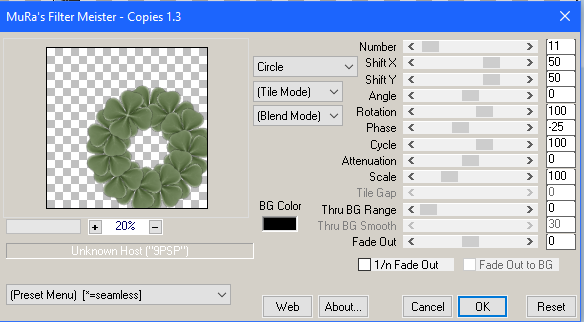
resize, use
MuRa's Copies
and Place to your liking, drop shadow
Element
61,
resize and Place to your liking, drop shadow
Element
53,
resize and Place to your liking, duplicate, mirror, drop shadow both
Element
76,
resize and Place to your liking, duplicate, mirror, drop shadow both
Element
13,
resize and Place to your liking, duplicate, mirror, drop shadow both
Element
77,
resize and Place to your liking, drop shadow
Element
37,
resize and Place to your liking, drop shadow
Element
39,
resize and Place to your liking, drop shadow
Element
35,
resize and Place to your liking, drop shadow
Element
65,
resize and Place to your liking, drop shadow
Element
95,
resize and Place to your liking, drop shadow
Element
17,
resize and Place to your liking, drop shadow
Element
14,
resize and Place to your liking, drop shadow
Element
23,
resize and Place to your liking, drop shadow
Element
58,
resize and Place to your liking, drop shadow
Element
92,
resize and Place to your liking, drop shadow
Element
97,
resize and Place to your liking, drop shadow
Element
5,
resize and Place to your liking
Resize
the signature if needed
The
name:
I am using the font: Hemera
II,
size 20, #272e1e, Apply Eye Candy #d5c7a4,
Drop Shadow

Add
your copyright information and license number before save
Tuesday, August 7, 2018
Starry Sky PTU Tut


Any
resemblance to any other tutorial or signature is merely coincidental
and is not intended.
I
am using the artwork of Rebeca
Sinz
–. You can purchase this artwork and a license to use them HERE
you MUST have a license to use this work (The
Moon and Stars)
I
am using the font:
Dreamer
I
am using the Plugins:
Alien Eye Candy 5, MuRa's
Meister Copies
I
am using mask of your choice
I
am using Drop Shadow -3 Vert, 3 Hori, Opacity 74, Blur 5.8 Color
#202020
Pieces
of the kit used in this tutorial are:
-
Paper 9
-
Paper 2
-
Frame 5
-
Flower 4
-
Curtain 1
-
Foliage 2
-
Doodle 2
-
Flower 3
-
Instrument 1
-
Sprinkle 1
-
Owl
-
Foliage 4
-
Candle 3
-
Star 2
-
Shoe 1
-
Butterfly 1
You
must have working knowledge of PSP to complete this tutorial. This
tutorial was written using PSPX8
Open
new Canvas 800*800
New
Layer, flood fill with Paper 9,
Apply mask and resize to your liking, Merge Group
C/P
Frame
5,
resize to your liking, Use Magic wand, select inside of the frame,
Selections - expand, 5 pixels, New Layer, Flood fill with Paper 2
Paste
Close up Tube between Paper 2
and Frame
5.
Select paper layer, select all, float, invert, Select Tube Layer
Delete
Paste
Full tube, resize and place to your liking, drop shadow
Flower
4,
apply MuRa's Meister Copies, drop shadow
Curtain
1,
resize and Place to your liking, drop shadow
Foliage
2,
resize and Place to your liking, drop shadow
Doodle
2,
resize and Place to your liking, drop shadow
Flower
3,
resize and Place to your liking, drop shadow
Instrument
1,
resize and Place to your liking, drop shadow
Sprinkle
1,
resize and Place to your liking, drop shadow
Owl,
resize and Place to your liking, drop shadow
Foliage
4,
resize and Place to your liking, drop shadow
Candle
3,
resize and Place to your liking, drop shadow
Star
2,
resize and Place to your liking, drop shadow
Shoe
1,
resize and Place to your liking, drop shadow
Butterfly
1,
resize and Place to your liking, drop shadow
Resize
the signature if needed
The
name:
I am using the font: Dreamer,
size 20, ##4e4d55
Apply Eye Candy #f6e5b7,
Drop Shadow
Add
your copyright information and license number before save
Saturday, August 4, 2018
Vibrant Beach PTU Tut

Any
resemblance to any other tutorial or signature is merely coincidental
and is not intended.
I
am using the artwork of Very
Many
–. You can purchase this artwork and a license to use them HERE
you MUST have a license to use this work (Alexis)
I
am using the font:
Dingle
Berries
I
am using the Plugins:
Alien Eye Candy 5,
I
am using mask of your choice
I
am using Drop Shadow -3 Vert, 3 Hori, Opacity 74, Blur 5.8 Color
#202020
Pieces
of the kit used in this tutorial are:
-
Paper 20
-
Paper 29
-
Frame 7
-
Element 72
-
Element 113
-
Element 48
-
Element 69
-
Element 98
-
Element 86
-
Element 79
-
Element 114
-
Element 88
-
Element 74
-
Element 54
-
Element 27
-
Element 28
-
Element 20
-
Element 46
-
Element 13
-
Element 119
You
must have working knowledge of PSP to complete this tutorial. This
tutorial was written using PSPX8
Open
new Canvas 800*800
New
Layer, flood fill with Paper 20,
Apply mask and resize to your liking, Merge Group
C/P
Frame
7,
resize to your liking, Use Magic wand, select inside of the frame,
Selections - expand, 5 pixels, New Layer, Flood fill with Paper 29
Paste
Full tube, resize and place to your liking, drop shadow
Element
72,
resize and Place to your liking, drop shadow
Element
113,
resize and Place to your liking, drop shadow
Element
48,
resize and Place to your liking, drop shadow
Element
69,
resize and Place to your liking, drop shadow
Element
98,
resize and Place to your liking, drop shadow
Element
86,
resize and Place to your liking, drop shadow
Element
79,
resize and Place to your liking, drop shadow
Element
114,
resize and Place to your liking, drop shadow
Element
88,
resize and Place to your liking, drop shadow
Element
74,
resize and Place to your liking, drop shadow
Element
54,
resize and Place to your liking, drop shadow
Element
27,
resize and Place to your liking, drop shadow
Element
28,
resize and Place to your liking, drop shadow
Element
20,
resize and Place to your liking, drop shadow
Element
46,
resize and Place to your liking, drop shadow
Element
13,
resize and Place to your liking, drop shadow
Element
119,
resize and Place to your liking, drop shadow
Resize
the signature if needed
The
name:
I am using the font: Dingle
Berries,
size 20, #5d064f,
Apply Eye Candy #ece4c7
Drop Shadow
Add
your copyright information and license number before save
Sweet Girl PTU Tut

Any
resemblance to any other tutorial or signature is merely coincidental
and is not intended.
I
am using the artwork of Mujica
–. You can purchase this artwork and a license to use them HERE
you MUST have a license to use this work (Naidia
2016)
I
am using the font:
Champignon
Alt
I
am using the Plugins:
Alien Eye Candy 5, MuRa's
Meister Copies
I
am using kit:
"Girly Days" From Freek's Creations you can
find it here
I
am using mask of your choice
I
am using Drop Shadow -3 Vert, 3 Hori, Opacity 74, Blur 5.8 Color
#202020
Pieces
of the kit used in this tutorial are:
-
Paper 9
-
Paper 8
-
Frame 2
-
Splash 2
-
Flower 6
-
Leaf 2
-
Flower 4
-
Flower 3
-
Candy
-
Cupcake 3
-
Ribbon
-
Mask
-
Gems
-
Word Art 2
-
Table
-
Candle
-
Butterfly
-
Sparkles
You
must have working knowledge of PSP to complete this tutorial. This
tutorial was written using PSPX8
Open
new Canvas 800*800
New
Layer, flood fill with Paper 9,
Apply mask and resize to your liking, Merge Group
C/P
Frame
2,
resize to your liking, Use Magic wand, select inside of the frame,
Selections - expand, 5 pixels, New Layer, Flood fill with Paper 8
Paste
Full tube, resize and place to your liking, drop shadow
Splash
2,
resize and Place to your liking, duplicate, mirror
Flower
6,
apply MuRa's Copies, drop shadow
Leaf
2,
resize and Place to your liking, duplicate, mirror, drop shadow both
Flower
4,
resize and Place to your liking, duplicate, mirror, drop shadow both
Flower
3,
resize and Place to your liking, duplicate, mirror, drop shadow both
Candy,
resize and Place to your liking, drop shadow
Cupcake
3,
resize and Place to your liking, drop shadow
Ribbon,
resize and Place to your liking, drop shadow
Mask,
resize and Place to your liking, drop shadow
Gems,
resize and Place to your liking, drop shadow
Word
Art 2,
resize and Place to your liking, drop shadow
Table,
resize and Place to your liking, drop shadow
Candle,
resize and Place to your liking, drop shadow
Butterfly,
resize and Place to your liking, drop shadow
Sparkles,
resize and Place to your liking
Resize
the signature if needed
The
name:
I am using the font: Champignon
Alt,
size 20, #f68ba9,
Apply Eye Candy #ffffff,
Drop Shadow
Add
your copyright information and license number before save
Wednesday, August 1, 2018
New PTU Kit - White Witch

This kit is full of Magick and Earthy Fantasy Elements. It matches "Germaine" from Celinart Pinup.
100 Unique Elements (non-repeated)
30 Papers 1000*1000 (Tagger Size)

Subscribe to:
Comments
(Atom)
MY BLINKIE

Facebook Me

Stores I Sell In


Who I CT For

 "
"
CU Licenses