Monday, March 11, 2013
Irish Maiden PTU Kit

Any resemblance to any other tutorial or signature is merely coincidental and is not intended.
I am using the artwork of Ismael Rac–. You can purchase this artwork and a license to use them HERE you MUST have a license to use his work (2013 Lucky Hat)
I am using the font: Leprechaun Hats
I am using plugins: Lokas 3-D shadow, Alien Eye Candy 5, Impact, Gradient Glow
I am using “Shamrock Maiden” From Rissa's Designs which you can purchase here
I am using DD_SPDMask3 by Dee, you can get it here
I am using Drop Shadow 2 Vert, 2 Hori, Opacity 90, Blur 2 Color #202020
Pieces of the kit used in this tutorial are
Paper 10
Paper 3
Frame 2
Shamrock Swirl
Love Flower
Box of Pearls
Hat
Pot of Gold
Fan
Humming Bird
Lipstick
Harp
You must have working knowledge of PSP to complete this tutorial. This tutorial was written using PSPXII
Open new Canvas 600*600
New Layer, flood fill with Paper 10 Apply mask and resize to your liking, Merge Group
c/p Frame2, rotate and resize to your liking, use magic wand, select the inside of your frame, Selections, Modify, Expand, pixels 5, okay, invert selection, new layer, flood fill with Paper 3
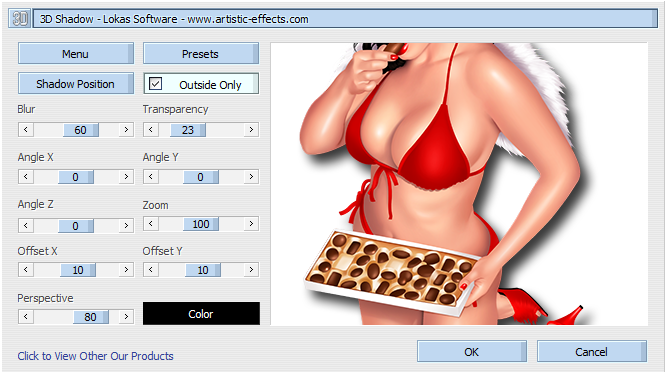
C/p Tube, over the top of the Frame,and resize to your liking, apply Lokas 3-d drop shadow:

Shamrock Swirl, resize and Place to your liking, between the mask and the paper, duplicate, mirror, flip, Shadow
Love Flower, Resize and place to your liking,Drop Shadow
Box of Pearls, resize to your liking, drop Shadow
Hat, Resize and Place to your liking, Drop Shadow
Pot of Gold, resize and place to your liking, Drop Shadow
Fan, resize, and Place to your liking
Humming Bird, resize, place to your liking, Drop Shadow
Lip Stick, place to your liking, Drop Shadow
Harp, place to your liking, Drop Shadow
Resize the signature if needed
The name:. Using Leprechuan hats size 36 Colors #174200, Apply Gradient Glow, #dcf379, drop shadow

Add your copyright information and license number before save

Sunday, March 10, 2013
Oh So Sexy PTU Tut

Any resemblance to any other tutorial or signature is merely coincidental and is not intended.
I am using the artwork of Arthur Crowe–. You can purchase this artwork and a license to use them HERE you MUST have a license to use his work (Gothic Rock)
I am using the font: Frosting for Breakfast
I am using plugins: Lokas 3-D shadow, Alien Eye Candy 5, Impact, Gradient Glow
I am using “Oh so Sexy, Oh So Hot” From Kizzed by Kelz which you can purchase here
I am using Mask 51 by Moonbeams and Spiderwebs, you can get it here
I am using Drop Shadow 2 Vert, 2 Hori, Opacity 90, Blur 2 Color #202020
Pieces of the kit used in this tutorial are
Paper 14
Paper 17
Oval Frame
Bling
Cocktail
CC
Car
Dice
Earrings
Lips
Glamorous
You must have working knowledge of PSP to complete this tutorial. This tutorial was written using PSPXII
Open new Canvas 600*600
New Layer, flood fill with Paper 14 Apply mask and resize to your liking, Merge Group
c/p Oval Frame, rotate and resize to your liking, use magic wand, select the inside of your frame, Selections, Modify, Expand, pixels 5, okay, invert selection, new layer, flood fill with Paper 17
C/p close up tube between frame and paper 17, arrange the way you like, repeat process with magic wand, leaving the tube inside the frame. ApplyHard Light, drop shadow
C/p Tube, over the top of the Frame,and resize to your liking, apply Lokas 3-d drop shadow:
Bling, resize and Place to your liking, between Frame and Paper Drop Shadow
Cocktail, Resize and place to your liking,Drop Shadow
CC, resize to your liking, drop Shadow
Car, Resize and Place to your liking, Drop Shadow
Dice, resize and place to your liking, Drop Shadow
Earrings, resize, and Place to your liking
Lips, resize, place to your liking, Drop Shadow
Glamorous, place to your liking, Drop Shadow
Resize the signature if needed
The name:. Using Frosting for Breakfast size 30 Colors ##bb0a27, Apply Gradient Glow, #000000 & #ffffff, drop shadow

Add your copyright information and license number before save
New PTU Kit - Hide the Eggs

Easter is coming, Hide the Eggs! Hide the Eggs! The Bright colors of this kit might make it a little hard
10 Papers 800*800 (Tagger Size)
60 Unique Elements
Wednesday, March 6, 2013
PTU Erotic Tut **SAC**

Any resemblance to any other tutorial or signature is merely coincidental and is not intended.
I am using the artwork of Ismeal Rac–. You can purchase this artwork and a license to use them HERE you MUST have a license to use his work (2013NaughtyXGirl2Bonus) **This tube DOES HAVE AN X-Rated layer!**
I am using the font: A&S Black Swan
I am using plugins: Lokas 3-D shadow,
I am using “Erotic” From Inzpired Creationz which you can purchase here
I am using KBH_2013_Mask9 by Kaci, you can get it here
I am using Drop Shadow 2 Vert, 2 Hori, Opacity 90, Blur 2 Color #202020
Pieces of the kit used in this tutorial are
Paper 9
Paper 15
Frame2
Disco Ball 1
Whip1
Heart 3
Condom 3
Lipstick
Cuffs 2
Sex Toy 2
Sex toy 3
Lips 3
Sparkles 1
You must have working knowledge of PSP to complete this tutorial. This tutorial was written using PSPXII
Open new Canvas 600*600
New Layer, flood fill with Paper 9 Apply mask and resize to your liking, Merge Group
c/p Frame2 resize to your liking, use magic wand, select the inside of your frame, Selections, Modify, Expand, pixels 5, okay, invert selection, new layer, flood fill with Paper 15
C/p close up tube between frame and paper 4, arrange the way you like, repeat process with magic wand, leaving the tube inside the frame. Apply Luminance Legacy, drop shadow
C/p Tube, over the top of the Frame,and resize to your liking, apply Lokas 3-d drop shadow:
Disco Ball, resize and Place to your liking, between Frame and Paper Drop Shadow
Whip 1, Resize and place to your liking,Drop Shadow
Heart 3, resize to your liking, drop Shadow
Condom 3, Resize and Place to your liking, Drop Shadow
Lip Stick, resize and place to your liking, Drop Shadow
Cuffs 2, resize, and Place to your liking
Sex Toy 2, resize, place to your liking, Drop Shadow
Sex Toy 3, place to your liking, Drop Shadow
Lips 3, resize, place to your liking, Drop Shadow
Sparkes 1, resize, place to your liking, Drop Shadow
Resize the signature if needed
The name:. Using A&S Black Swan size 36 Colors #000000, stroke 2.0 width color #d84a9e, drop shadow
Add your copyright information and license number before save
Tuesday, March 5, 2013
Creative Crazy Sraps Blog Train

The Creative Crazy Scraps Blog Train has left the station! Choo Choo! 50 Shades of Shamrock
was our theme this month! You can Download my Portion here
Stu with:CreativeCrazyScraps
Becca with: Designz By Baby Dragon
Alyson with: Tyger's Tidbits
Jim with: Horse-ing Around
Heather with: Heather Devine Dezigns
Jessica with: Gothic Inspirations
Always with: Always Creations
Tasha with: Tasha's Playground
Suzanne with: Twyzted Playground
Kelly with: Evol Angel Scrapz
Anna with: Annaz Attic
Millie with: Millies Psp Madness
Rissa with: Rissa Designs
Danielle with:Scraps By Danielle
Kate with:Irish Princess Designs << You are here
Shell with: Shells Scraps
Cupcake Rainbow Snags


Cupcake Rainbow FTU Cluster Frame

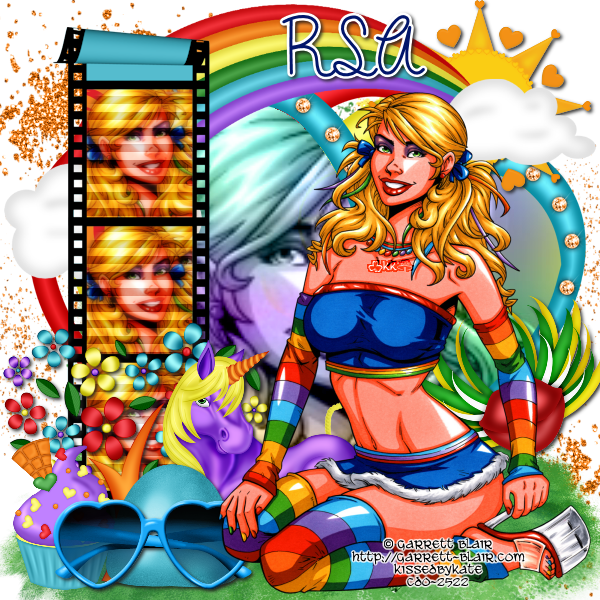
Rainbow Cupcake PTU tut

Any resemblance to any other tutorial or signature is merely coincidental and is not intended.
I am using the artwork of Ismeal Rac–. You can purchase this artwork and a license to use them HERE you MUST have a license to use his work (Rainbow)
I am using the font: Dreamland Stars
I am using plugins: Lokas 3-D shadow, Alien Eye Candy 5 Impact, Gradient Glow
I am using “Rainbow Cupcake” From Wicked Princess Designs which you can purchase here
I am using Mask 363 by Vix, here
I am using Drop Shadow 2 Vert, 2 Hori, Opacity 90, Blur 2 Color #202020
Pieces of the kit used in this tutorial are
WP_RC_Paper6
WP_RC_Paper4
WP_RC_PaperHeartFrame
WP_RC_Grass2
WP_RC_Startrail
WP_RC_Tree
WP_RC_Cherries
WP_RC_Unicorn2
WP_RC_Cakepops
WP_RC_Cupcake1
WP_RC_Flower
WP_RC_Sun
WP_RC_Rainbow
You must have working knowledge of PSP to complete this tutorial. This tutorial was written using PSPXII
Open new Canvas 600*600
New Layer, flood fill with Paper 6 Apply mask and resize to your liking, Merge Group
c/p PaperHeartFrame resize to your liking, use magic wand, select the inside of your frame, Selections, Modify, Expand, pixels 5, okay, invert selection, new layer, flood fill with Paper 4
C/p close up tube between frame and paper 4, arrange the way you like, repeat process with magic wand, leaving the tube inside the frame. Duplicate, apply soft light to the dupilcate, Guassian Blur, 3.0 to original, drop shadow
C/p Tube, over the top of the Frame,and resize to your liking, apply Lokas 3-d drop shadow:

WP_RC_Grass2, resize and Place to your liking, Drop Shadow
WP_RC_Startrail, Resize and place to your liking,Drop Shadow
WP_RC_Tree, resize to your liking, drop Shadow
WP_RC_Cherries, Resize and Place to your liking, Drop Shadow
WP_RC_Unicorn2, resize and place to your liking, Drop Shadow
WP_RC_Cakepops, resize, and Place to your liking
WP_RC_Cupcake1, resize, place to your liking, Drop Shadow
WP_RC_Flower, resize, place to your liking, Drop Shadow
WP_RC_Sun, resize, place to your liking, Drop Shadow
WP_RC_Rainbow, resize, place to your liking, Drop Shadow
Resize the signature if needed
The name:. Using Dreamland Stars size 20 Colors #d4171c, Apply Gradient Glow, #d9cc13, then Drop Shadow
Add your copyright information and license number before save
Sunday, March 3, 2013
Easter Spring Affair PTU Tut

Any resemblance to any other tutorial or signature is merely coincidental and is not intended.
I am using the artwork of Arthur Crowe –. You can purchase this artwork and a license to use them HERE you MUST have a license to use his work (Rinbow Babe - March Calender)
I am using the font: Phraell
I am using plugins: Lokas 3-D shadow, Alien Eye Candy 5 Impact, Gradient Glow
I am using “Easter Spring Affiar” From Dran Designs which you can purchase here
I am using Mask 137 by Vaybs, here
I am using Drop Shadow 2 Vert, 2 Hori, Opacity 90, Blur 2 Color #202020
Pieces of the kit used in this tutorial are
Paper 1
Paper 7
Frame 1
Element 63
Element 10
Element 11
Element 8
Element 13
Element 14
Element 25
Element 49
Element 68
You must have working knowledge of PSP to complete this tutorial. This tutorial was written using PSPXII
Open new Canvas 600*600
New Layer, flood fill with Paper 1 Apply mask and resize to your liking, Merge Group
c/p Shamrock Wreath, resize to your liking, use magic wand, select the inside of your frame, Selections, Modify, Expand, pixels 5, okay, invert selection, new layer, flood fill with Paper 7.
C/p Tube, over the top of the Frame,and resize to your liking, apply Lokas 3-d drop shadow:
Element 63,Place between frame and Paper 7, repeat magic wand steps leaving the fence inside the window
Element 10, Resize and place to your liking,Drop Shadow
Element 11, resize to your liking, drop Shadow
Element 8, Resize and Place to your liking, Drop Shadow
Element 13, resize and place to your liking, Drop Shadow
Element 14, resize, and Place to your liking
Element 25, resize, place to your liking, Drop Shadow
Element 49, resize, place to your liking, Drop Shadow
Element 68, resize, place to your liking, Drop Shadow
Resize the signature if needed
The name:. Using Phraell size 36 Colors #e86b83, Apply Gradient Glow, #f4d175, then Drop Shadow

Add your copyright information and license number before save
Friday, March 1, 2013
Sale for March

All my Designs are 40% off for the month of March!
Subscribe to:
Posts
(Atom)
MY BLINKIE

Facebook Me

Stores I Sell In


Who I CT For

 "
"

CU Licenses