Saturday, August 6, 2016
Flower Beauty PTU Tut

Any
resemblance to any other tutorial or signature is merely coincidental
and is not intended.
I
am using the artwork of Arthur
Crowe
–. You can purchase this artwork and a license to use them HERE
you MUST have a license to use this work (Beauty
Flower Babe)
I
am using the font:
Peach
Sundress
I
am using the Plugins:
Alien Eye Candy 5,
I
am using mask of your choice
I
am using Drop Shadow -3 Vert, 3 Hori, Opacity 74, Blur 5.8 Color
#202020
Pieces
of the kit used in this tutorial are:
-
Paper 1
-
Paper 4
-
Frame 1
-
Element 18
-
Element 10
-
Element 12
-
Element 11
-
Element 9
-
Element 7
-
Element 8
-
Element 6
You
must have working knowledge of PSP to complete this tutorial. This
tutorial was written using PSPX8
Open
new Canvas 800*800
New
Layer, flood fill with Paper 1,
Apply mask and resize to your liking, Merge Group
C/P
Frame
1,
resize to your liking, Use Magic wand, select inside of the frame,
Selections - expand, 5 pixels, New Layer, Flood fill with Paper 4
Paste
Full tube, resize and place to your liking, drop shadow
Element
18,
resize and Place to your liking, drop shadow
Element
10,
resize and Place to your liking, drop shadow
Element
12,
resize and Place to your liking, drop shadow
Element
11,
resize and Place to your liking, drop shadow
Element
9,
resize and Place to your liking, drop shadow
Element
7,
resize and Place to your liking, drop shadow
Element
8,
resize and Place to your liking, drop shadow
Element
6,
resize and Place to your liking, drop shadow
Resize
the signature if needed
The
name:
I am using the font: Peach
Sundress,
size 20, #b62824,
Apply Eye Candy #ffffff,
Drop Shadow

Add
your copyright information and license number before save

Thursday, August 4, 2016
Exotic Oasis PTU Tut

Any
resemblance to any other tutorial or signature is merely coincidental
and is not intended.
I
am using the artwork of Nocturne
–. You can purchase this artwork and a license to use them HERE
you MUST have a license to use this work (Spring
Summer)
I
am using the font:
Amal
Demo
I
am using the Plugins:
Alien Eye Candy 5,
I
am using mask of your choice
I
am using Drop Shadow -3 Vert, 3 Hori, Opacity 74, Blur 5.8 Color
#202020
Pieces
of the kit used in this tutorial are:
-
Paper 14
-
Paper 9
-
Frame 9
-
Element 172
-
Element 91
-
Element 162
-
Element 155
-
Element 133
-
Element 110
-
Element 60
-
Element 13
-
Element 8
-
Element 30
You
must have working knowledge of PSP to complete this tutorial. This
tutorial was written using PSPX8
Open
new Canvas 800*800
New
Layer, flood fill with Paper 14,
Apply mask and resize to your liking, Merge Group
C/P
Frame
, flip horizontal,
resize to your liking, Use Magic wand, select inside of the frame,
Selections - expand, 5 pixels, New Layer, Flood fill with Paper 9
Paste
Full tube, resize and place to your liking, drop shadow
Element
172,
resize and Place to your liking, drop shadow
Element
91,
resize and Place to your liking, drop shadow
Element
162,
resize and Place to your liking, drop shadow
Element
155,
resize and Place to your liking, drop shadow
Element
133,
resize and Place to your liking, drop shadow
Element
110,
resize and Place to your liking, drop shadow
Element
60,
resize and Place to your liking, drop shadow
Element
13,
resize and Place to your liking, drop shadow
Element
8,
resize and Place to your liking, drop shadow
Element
30,
resize and Place to your liking, drop shadow
Resize
the signature if needed
The
name:
I am using the font: Amal
Demo,
size 20, #d7287f,
Apply Eye Candy #dde7ef,
Drop Shadow
Add
your copyright information and license number before save
Saturday, July 30, 2016
New PTU Kit - On the Boardwalk

Blues, Creams and Browns make up this Beachy Summer kit
100 unrepeated elements
20 Papers 1000*1000 (Tagger Size)
New PTU Kit - Silence


Shades of Aqua, Mauve and Grey make up this beautiful matching kit for a tube from Rebecca Sinz of the same name
100 Unrepeated elements
20 1000*1000 Papers (tagger Size)
New PTU Kit - Briar Rose


This kit is full of Fairy Tale elements, matches the Rebecca Sinz Tube of the same name. Her store is here
100 Unrepeated Elements
20 1000*1000 Papers (Tagger Size)
Sunday, July 24, 2016
New PTU Kit - Mushroom Magick

Plenty of Mushroom Magick to be found in this kit. Reds, Oranges, Yellows and Cute little shrooms.
100 unrepeated elements
20 Tagger size papers 1000*1000
Wednesday, July 20, 2016
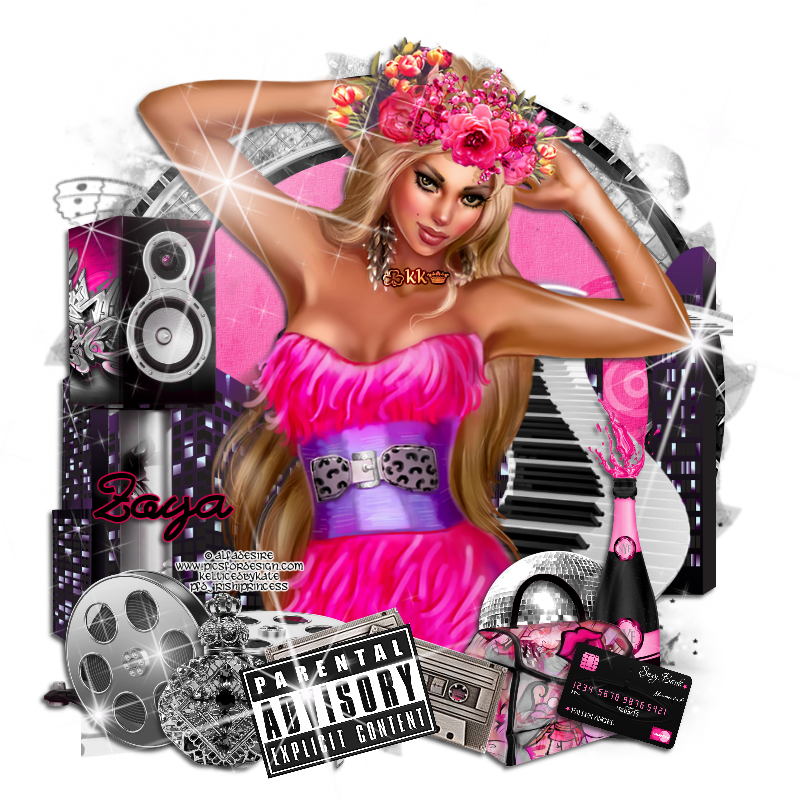
Just Dance PTU Tut

Any
resemblance to any other tutorial or signature is merely coincidental
and is not intended.
I
am using the artwork of Alfadesire
–. You can purchase this artwork and a license to use them HERE
you MUST have a license to use this work (Dancing
Girl)
I
am using the font:
Bastardilla
I
am using the Plugins:
Alien Eye Candy 5,
I
am using mask of your choice
I
am using Drop Shadow -3 Vert, 3 Hori, Opacity 74, Blur 5.8 Color
#202020
Pieces
of the kit used in this tutorial are:
-
Paper 19
-
Paper 11
-
Frame 8
-
Element 117
-
Element 84
-
Element 75
-
Element 83
-
Element 43
-
Element 15
-
Element 40
-
Element 77
-
Element 66
-
Element 22
-
Element 68
-
Element 165
You
must have working knowledge of PSP to complete this tutorial. This
tutorial was written using PSPX8
Open
new Canvas 800*800
New
Layer, flood fill with Paper 19,
Apply mask and resize to your liking, Merge Group
C/P
Frame
8,
resize to your liking, Use Magic wand, select inside of the frame,
Selections - expand, 5 pixels, New Layer, Flood fill with Paper 11
Paste
Full tube, resize and place to your liking, drop shadow
Element
117,
resize and Place to your liking, drop shadow
Element
84,
resize and Place to your liking, drop shadow
Element
75,
resize and Place to your liking, drop shadow
Element
83,
resize and Place to your liking, drop shadow
Element
43,
resize and Place to your liking, drop shadow
Element
15,
resize and Place to your liking, drop shadow
Element
40,
resize and Place to your liking, drop shadow
Element
77,
resize and Place to your liking, drop shadow
Element
66,
resize and Place to your liking, drop shadow
Element
22,
resize and Place to your liking, drop shadow
Element
68,
resize and Place to your liking, drop shadow
Element
165,
resize and Place to your liking
Resize
the signature if needed
The
name:
I am using the font: Bastardilla,
size 20, #000000,
Apply Eye Candy #e6004c,
Drop Shadow
Add
your copyright information and license number before save
Sea Mist PTU Tut


Any
resemblance to any other tutorial or signature is merely coincidental
and is not intended.
I
am using the artwork of Rebecca
Sinz
–. You can purchase this artwork and a license to use them HERE
you MUST have a license to use this work (Sea
Mist)
I
am using the font:
Ocean
I
am using the Plugins:
Alien Eye Candy 5,
I
am using kit:
"AndreeaCernestean-July2016"
From Tasha's
Playground,
you can find her
stores on her blog here
I
am using mask of your choice
I
am using Drop Shadow -3 Vert, 3 Hori, Opacity 74, Blur 5.8 Color
#202020
Pieces
of the kit used in this tutorial are:
-
Paper 02
-
Element 24
-
Element 6
-
Element 14
-
Element 3
-
Element 11
-
Element 2
-
Element 7
-
Element 3
-
Element 19
-
Element 21
-
Word Art
You
must have working knowledge of PSP to complete this tutorial. This
tutorial was written using PSPX8
Open
new Canvas 800*800
New
Layer, flood fill with Paper 2,
Apply mask and resize to your liking, Merge Group
Paste
Full tube, resize and place to your liking, drop shadow
Element
24, resize and Place to your liking, drop shadow
Element
6,
resize and Place to your liking, drop shadow
Element
14,
resize and Place to your liking, drop shadow
Element
3,
resize and Place to your liking, drop shadow
Element
11,
resize and Place to your liking, drop shadow
Element
2,
resize and Place to your liking, drop shadow
Element
7,
resize and Place to your liking, drop shadow
Element
3,
resize and Place to your liking, drop shadow
Element
19,
resize and Place to your liking, drop shadow
Element
21,
resize and Place to your liking, drop shadow
Word
Art,
resize and Place to your liking, drop shadow
Resize
the signature if needed
The
name:
I am using the font: Ocean,
size 20, #87aaac,
Apply Eye Candy #ffffff,
Drop Shadow
Add
your copyright information and license number before save
Subscribe to:
Posts
(Atom)
MY BLINKIE

Facebook Me

Stores I Sell In


Who I CT For

 "
CU Licenses