Saturday, September 29, 2018
What a Witch PTU Tut

Any
resemblance to any other tutorial or signature is merely coincidental
and is not intended.
I
am using the artwork of Ingrid
Crowe
–. You can purchase this artwork and a license to use them HERE
you MUST have a license to use this work (Night
Wicked)
I
am using the font:
Gypsy
Curse
I
am using the Plugins:
Alien Eye Candy 5,
I
am using mask of your choice
I
am using Drop Shadow -3 Vert, 3 Hori, Opacity 74, Blur 5.8 Color
#202020
Pieces
of the kit used in this tutorial are:
-
Paper 1
-
Paper 4
-
Frame 2
-
Splash
-
Moon
-
Tree
-
Grass
-
Runes
-
Stool
-
Bird
-
Wand
-
Salt
-
Potion
-
Bag
-
Powder
-
Rat
-
Sparkle
You
must have working knowledge of PSP to complete this tutorial. This
tutorial was written using PSPX8
Open
new Canvas 800*800
New
Layer, flood fill with Paper 1
Apply mask and resize to your liking, Merge Group
C/P
Frame
2,
resize to your liking, Use Magic wand, select inside of the frame,
Selections - expand, 5 pixels, New Layer, Flood fill with Paper 4
Paste
tube, resize and place to your liking, drop shadow
Splash,
resize and Place to your liking, drop shadow
Moon,
resize and Place to your liking, drop shadow
Tree,
resize and Place to your liking, drop shadow
Grass,
resize and Place to your liking, drop shadow
Runes,
resize and Place to your liking, drop shadow
Stool,
resize and Place to your liking, drop shadow
Bird,
resize and Place to your liking, drop shadow
Wand,
resize and Place to your liking, drop shadow
Salt,
resize and Place to your liking, drop shadow
Potion,
resize and Place to your liking, drop shadow
Bag,
resize and Place to your liking, drop shadow
Powder,
resize and Place to your liking, drop shadow
Rat,
resize and Place to your liking, drop shadow
Sparkle,
resize and Place to your liking, drop shadow
Resize
the signature if needed
The
name:
I am using the font: AuldMagick, size 20, #000000,
Apply Eye Candy #d3d886,
Drop Shadow

Add
your copyright information and license number before save
Walk the Plank PTU Tut

Any
resemblance to any other tutorial or signature is merely coincidental
and is not intended.
I
am using the artwork of Tony
T
–. You can purchase this artwork and a license to use them HERE
you MUST have a license to use this work (Pirate)
I
am using the font:
Black
Chancery
I
am using the Plugins:
Alien Eye Candy 5,
I
am using mask of your choice
I
am using Drop Shadow -3 Vert, 3 Hori, Opacity 74, Blur 5.8 Color
#202020
Pieces
of the kit used in this tutorial are:
-
Paper 2
-
Paper 1
-
Frame 2
-
Element 2
-
Element 8
-
Element 13
-
Element 1
-
Element 17
-
Element 9
-
Element 18
-
Element 16
-
Element 14
-
Word Art
You
must have working knowledge of PSP to complete this tutorial. This
tutorial was written using PSPX8
Open
new Canvas 800*800
New
Layer, flood fill with Paper 2,
Apply mask and resize to your liking, Merge Group
C/P
Frame
2,
resize to your liking, Use Magic wand, select inside of the frame,
Selections - expand, 5 pixels, New Layer, Flood fill with Paper 1
Paste
Close up Tube between Paper 15
and Element 88. Select paper layer, select all, float, invert,
Select Tube Layer Delete, Set
Blend to Hard Light, drop Shadow
Paste
Full tube, resize and place to your liking, drop shadow
-
Element 2, resize and Place to your liking, drop shadow
-
Element 8, resize and Place to your liking, drop shadow
-
Element 13, resize and Place to your liking, drop shadow
-
Element 1, resize and Place to your liking, drop shadow
-
Element 17, resize and Place to your liking, drop shadow
-
Element 9, resize and Place to your liking, drop shadow
-
Element 18, resize and Place to your liking, drop shadow
-
Element 16, resize and Place to your liking, drop shadow
-
Element 14, resize and Place to your liking, drop shadow
-
Word Art, resize and Place to your liking, drop shadow
Resize
the signature if needed
The
name:
I am using the font: Black
Chancery,
size 20, #72321e,
Apply Eye Candy #ffffff,
Drop Shadow
Add
your copyright information and license number before save
Friday, September 28, 2018
Autumn Season PTU Tut

Any
resemblance to any other tutorial or signature is merely coincidental
and is not intended.
I
am using the artwork of Zindy
–. You can purchase this artwork and a license to use them HERE
you MUST have a license to use this work (Fox
and the Girl)
I
am using the font:
Soulamker
in the Mountains
I
am using the Plugins:
Alien Eye Candy 5, MuRa
Meister Copies
I
am using mask of your choice
I
am using Drop Shadow -3 Vert, 3 Hori, Opacity 74, Blur 5.8 Color
#202020
Pieces
of the kit used in this tutorial are:
-
Element 5
-
Paper 3
-
Frame 3
-
Element 1
-
Element 63
-
Element 65
-
Element 9
-
Element 36
-
Element 54
-
Element 43
-
Element 19
-
Element 32
-
Element 18
-
Element 41
-
Element 58
You
must have working knowledge of PSP to complete this tutorial. This
tutorial was written using PSPX8
Open
new Canvas 800*800
New
Layer, flood fill with Element
5,
Apply mask and resize to your liking, Merge Group
C/P
Frame
3,
resize to your liking, Use Magic wand, select inside of the frame,
Selections - expand, 5 pixels, New Layer, Flood fill with Paper 3
Paste
Close up Tube between Paper 3
and Frame
3
Select paper layer, select all, float, invert, Select Tube Layer
Delete
Element
1,
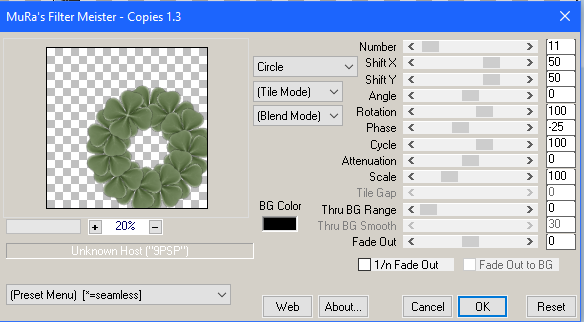
apply MuRa's Copies, dropshadow
Element 63, resize and Place to your liking, drop shadow
Element 65, resize and Place to your liking, drop shadow
Element 9, resize and Place to your liking, drop shadow
Element 36, resize and Place to your liking, drop shadow
Element 54, resize and Place to your liking, drop shadow
Element 43, resize and Place to your liking, drop shadow
Element 19, resize and Place to your liking, drop shadow
Element 32, resize and Place to your liking, drop shadow
Element 18, resize and Place to your liking, drop shadow
Element 41, resize and Place to your liking, drop shadow
Element 58, resize and Place to your liking, drop shadow
Element 63, resize and Place to your liking, drop shadow
Element 65, resize and Place to your liking, drop shadow
Element 9, resize and Place to your liking, drop shadow
Element 36, resize and Place to your liking, drop shadow
Element 54, resize and Place to your liking, drop shadow
Element 43, resize and Place to your liking, drop shadow
Element 19, resize and Place to your liking, drop shadow
Element 32, resize and Place to your liking, drop shadow
Element 18, resize and Place to your liking, drop shadow
Element 41, resize and Place to your liking, drop shadow
Element 58, resize and Place to your liking, drop shadow
Resize
the signature if needed
The
name:
I am using the font: Soul
Maker in the Mountains,
size 20, #613920,
Apply Eye Candy #fefae1,
Drop Shadow
Add
your copyright information and license number before save
Fantastically Free Blog Train - Halloween

Don’t forget to swing by the other stops on the train:


You are ^^^ here

Due to different time zones, if someone's part isn't up yet, be sure to check back for it!
Download My Portion here
Sunday, September 23, 2018
New PTU Kit - Morose

A beautifully Sad kit.
160 Elements
30 1000*1000 Papers (tagger Size)
New PTU Kit - Little Monsters

Halloween!!!!!!
172 Elements
30 1000*1000 Papers (Tagger Size)
Darkness PTU Tut


Any
resemblance to any other tutorial or signature is merely coincidental
and is not intended.
I
am using the artwork of Rebeca
Sinz
–. You can purchase this artwork and a license to use them HERE
you MUST have a license to use this work (Gothic
Moon)
I
am using the Plugins:
Alien Eye Candy 5,
I
am using mask of your choice
I
am using Drop Shadow -3 Vert, 3 Hori, Opacity 74, Blur 5.8 Color
#202020
Pieces
of the kit used in this tutorial are:
-
Paper 2
-
Paper 5
-
Frame 1
-
Element 3
-
Element 2
-
Element 20
-
Element 9
-
Element 2
-
Element 19
-
Element 3
-
Element 4
-
Word Art
You
must have working knowledge of PSP to complete this tutorial. This
tutorial was written using PSPX8
Open
new Canvas 800*800
New
Layer, flood fill with Paper 2,
Apply mask and resize to your liking, Merge Group
C/P
Frame
1,
flip
horizontal,
resize to your liking, Use Magic wand, select inside of the frame,
Selections - expand, 5 pixels, New Layer, Flood fill with Paper 5
Paste
Close up Tube between Paper 15
and Element 88. Select paper layer, select all, float, invert,
Select Tube Layer Delete
Element
3,
resize and Place to your liking, drop shadowElement 2, resize and Place to your liking, drop shadow
Element 20, resize and Place to your liking, drop shadow
Element 9, resize and Place to your liking, drop shadow
Element 2, resize and Place to your liking, drop shadow
Element 19, resize and Place to your liking, drop shadow
Element 3, resize and Place to your liking, drop shadow
Element 4, resize and Place to your liking, drop shadow
Word Art, resize and Place to your liking, drop shadow
Resize
the signature if needed
https://blogger.googleusercontent.com/img/b/R29vZ2xl/AVvXsEiJETr6grnwchzNOxmFmh7ka6svsd5Bs4BffcfEmpJQIhPyUJinURcKc5OwfBg4azGcxpvXGEwT2jMQgHWgV1JfiqmoAV3bhVep2V8BgW4tVwfwY3WrNpg0lcks8wPkmjehXJwgXJ4cDLzp/s320/EyeCandy5NiceWhite.png
Add
your copyright information and license number before save
Subscribe to:
Posts
(Atom)
MY BLINKIE

Facebook Me

Stores I Sell In


Who I CT For

 "
"

CU Licenses